

Skip to content
  • GDPR-compliant
  • 100% hosting in Germany
  • Personal contact
  • Support included
  • Provisioning within 24 hours
Webhosting verwalten 3 min read

Upgrade your hosting package: get more performance by changing your plan

As your project grows, your web hosting simply grows with it. You can upgrade your plan directly in the customer area to a larger package - for example, from Professional M to Premium M. Your hosting account remains the same; only the features such as storage, FTP access and databases are increased.

Step 1: Open your web hosting plan

In the menu, go to My Products → Web Hosting and select the hosting plan you want. The ‘Plan’ tab is already open in the details section. Here you can see your current package, the billing period, the included services and the price overview with the date of your next invoice.
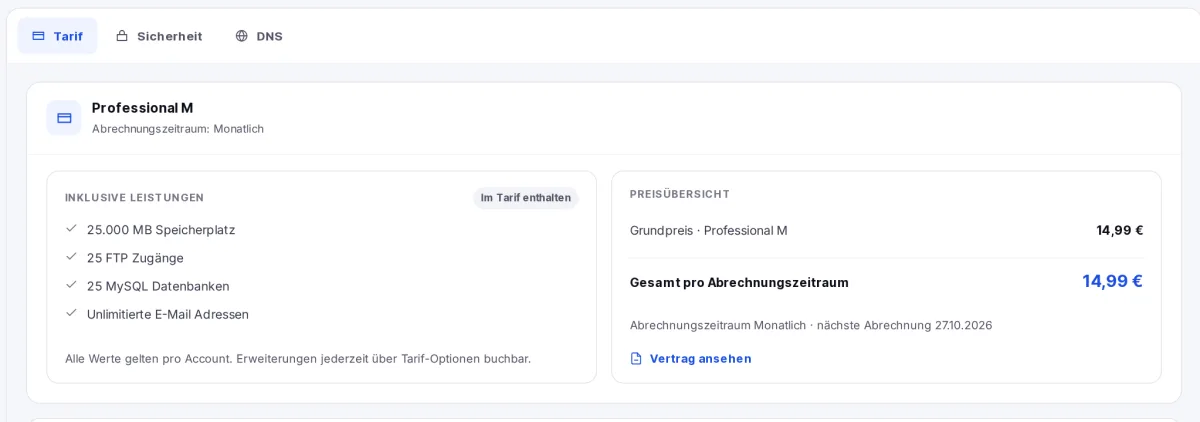
Web hosting ‘Plan’ tab: current package, features and price overview
The ‘Plan’ tab: current package, services included and price overview.

Step 2: View upgrades

Further down in the tab, you’ll find the ‘Plan Upgrade’ section. Click on ‘View upgrades’ to see all the packages you can switch to.

‘Plan Upgrade’ section, using the ‘Show Upgrades’ button
The ‘Plan Upgrade’ section with the ‘View upgrades’ button.

Step 3: Select a new package

At the top, you’ll see your current plan with the monthly price and the date of your next billing. Below that, you’ll see every available package with:

  • the additional cost per month compared to your current plan (e.g. ‘+€35.00 per month’)
  • the new monthly price and the key features
  • the one-off upgrade fee - this is the pro-rata price difference for the remaining days until the next billing date

Click ‘Switch to …’ for your chosen package, for example ‘Switch to Premium M’.
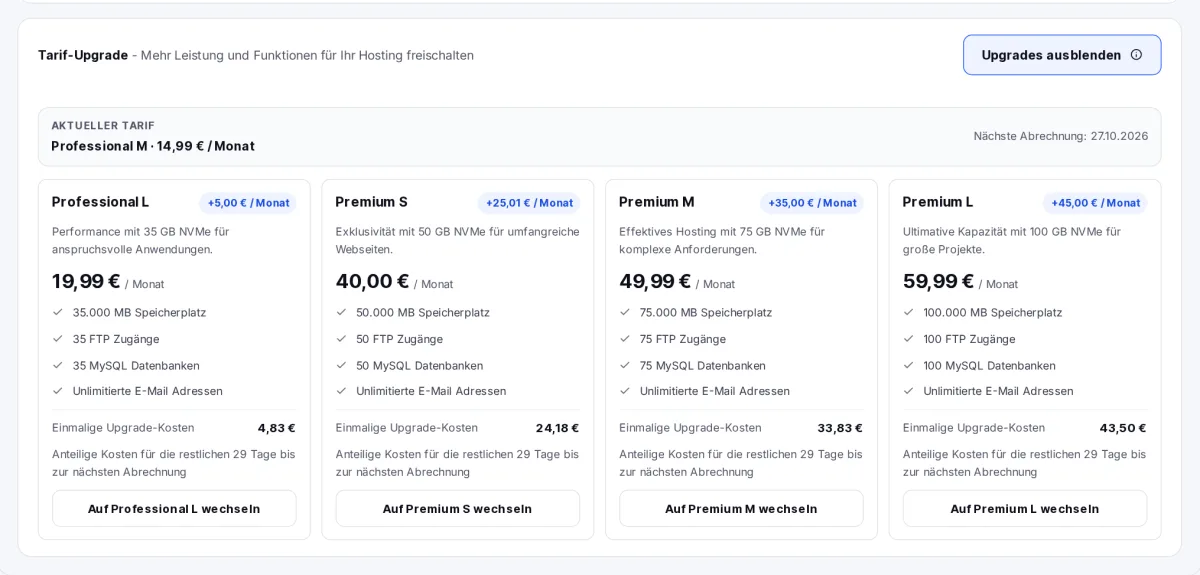
Available upgrade packages, including monthly prices, services and pro-rata upgrade costs
The available packages, including any additional charges, services and pro-rata upgrade costs.

Step 4: Check the costs and place your order

A summary of your switch will appear below the packages. It shows the pro-rata price difference and the amount due, including VAT. Tick the box next to ‘I confirm the chargeable tariff switch’ and click ‘Order now (chargeable)’.
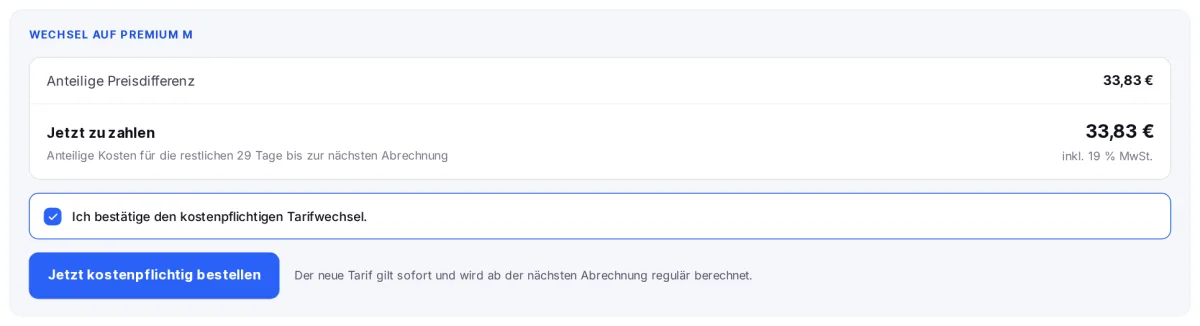
Summary of the tariff change, including confirmation and a button to place an order
Summary: pro rata costs, confirmation and order.

What happens after you place your order

  • The new plan takes effect immediately - the enhanced services are available to you straight away.
  • We will issue an invoice for the pro-rata difference, and you will be forwarded to this after placing your order. You can find it at any time under Billing → Invoices.
  • From the next billing cycle onwards, the new tariff price will be charged as normal.

If there are no charges for the current period, the summary will show ‘No immediate charges’ - the new price will then apply from the next billing cycle.

Only expand individual resources?

If you simply need more storage or additional services, it is not always necessary to change your package. Please also check the ‘Plan’ tab for the available plan options - there you can add extras to your existing package on an individual basis.

Would you prefer a smaller package?

In the customer area, we only offer upgrades to larger packages. If you would like to switch to a smaller package, please submit a support ticket.

Will any data be lost during the upgrade?
No. Your hosting account, including your websites, databases and mailboxes, will remain entirely unchanged. Only the limits of the package will be increased.
Why do I have to pay anything already?
The new plan applies immediately. We will therefore charge the price difference on a pro rata basis for the remaining days until your next regular billing date. After that, the new price will apply.
Why can’t I see any upgrades?
If you are already on the largest package, the customer area will display a message stating that you are on the highest available plan. Please do not hesitate to contact us regarding any specific requirements, such as a managed cloud server.
Will my payment frequency change?
No. The upgrade only changes the package. To find out how to switch to annual payments instead of monthly ones, please refer to the guide ‘Change payment frequency’.

Was this article helpful?

New to SpeedIT Solutions?

Hosting where you know someone.

What you are reading here is what we put into practice for our customers every day. Based in Isernhagen since 2009 - with dedicated contact persons rather than a call centre.

  • 100 % Hosting in Deutschland
  • DSGVO-konform
  • Persönlicher Ansprechpartner
  • Bereitstellung innerhalb von 24 Stunden
4.9 88 reviews on Expeero

Sofort überzeugender Service

Wir nutzen erst relativ kurz (~1 Jahr) die Angebote von SpeedIT und sind vom Erstkontakt an sehr überzeugt vom preiswerten Angebot, aber insbesondere vom pfeilschnellen und persönlcihen Support.
ChristianRecommends us · 08/01/2025

100 % recommend us · Expeero

All reviews on HOSTtest (opens in a new window)

You might also be interested in:

Personal support

Of course, our support team is also happy to assist you personally. If you cannot find what you are looking for in our knowledge base or require personalised support, please do not hesitate to contact us. We’re here to help you and to ensure that your experience with our products and services is as smooth and enjoyable as possible.