


With email tracking, you can find out what happened to an email in a matter of seconds. To do this, open your service and go to the Email Tracking tab.
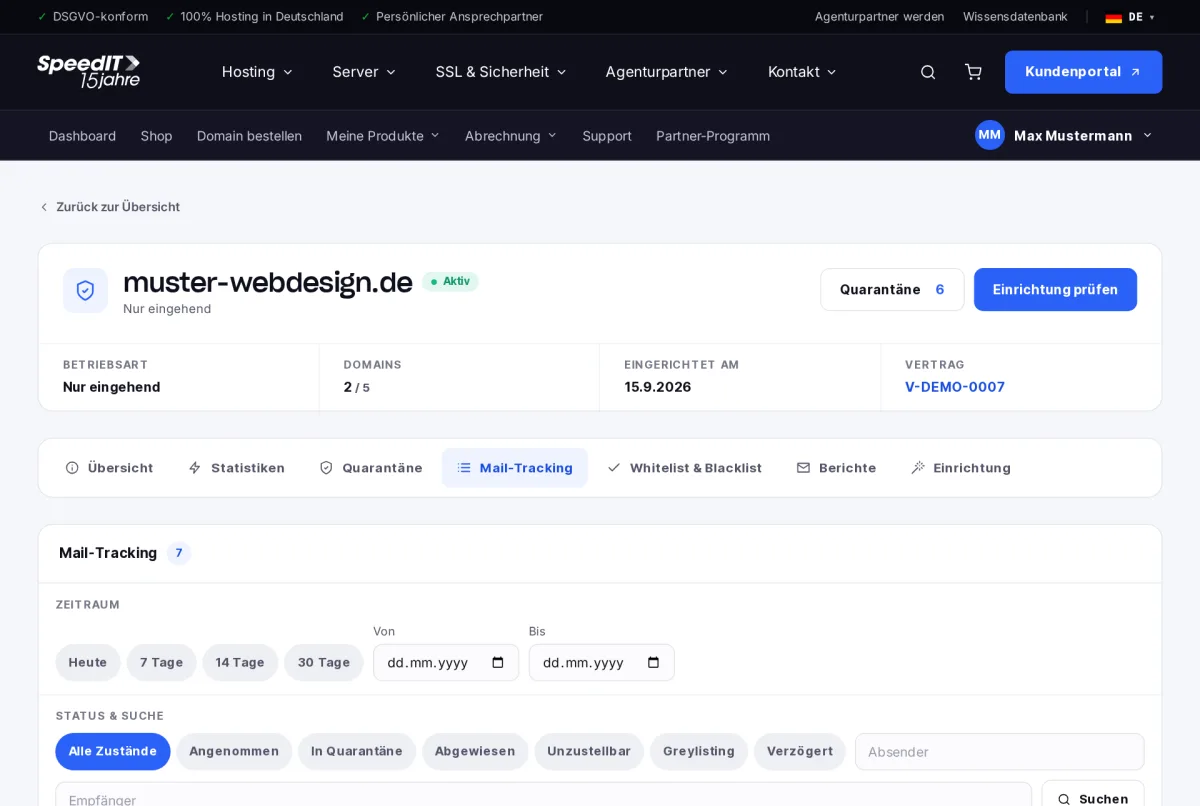
Find an email
- Select the time period: Today, 7, 14 or 30 days, or a custom time period.
- If necessary, filter by status.
- Search by sender or recipient.
The statuses
- Accepted - the email has been delivered to your mail server
- In quarantine - held back as spam or a virus
- Rejected - rejected upon receipt
- Undeliverable - your mail server refused to accept it
- Greylisting - the sender has been asked to try delivering the email again later
- Delayed - a further delivery attempt will be made
Greylisting is normal
In the case of unknown senders, greylisting delays the first delivery by a few minutes. Reputable mail servers automatically retry - spammers usually do not.
An email is marked as ‘Accepted’, but isn’t in my inbox. Why is that?
SpamGate has then forwarded the email to your mail server. Please check the spam folder in your inbox and the filter rules in your email programme.