

Skip to content
  • GDPR-compliant
  • 100% hosting in Germany
  • Personal contact
  • Support included
  • Provisioning within 24 hours
Verträge & Bestellungen 4 min read

Change payment frequency: pay annually instead of monthly

You decide how often you pay for a contract. Many products are available on a monthly, quarterly, half-yearly or annual basis. The longer the payment interval, the cheaper it usually is - for example, with an annual payment, you save 10 per cent compared with monthly payments.

Step 1: Open the contract

Go to the menu: Billing → Contracts and select the contract you want. Alternatively, you can access this from your hosting dashboard via ‘View contract’. In the top right-hand corner, you’ll find the ‘Change payment interval’ button; your current interval is shown next to the contract number and under ‘billing period’.
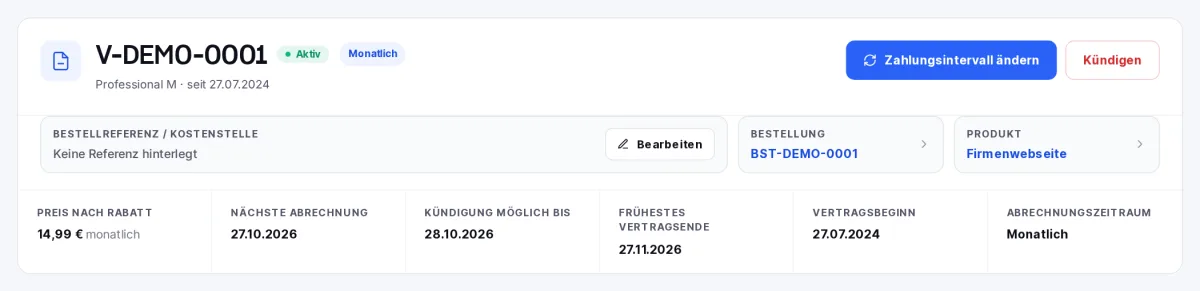
Contract details, including the ‘Change payment interval’ button and the current billing period
The contract details with the ‘Change payment interval’ button.

Can’t see the button?

The button only appears if the product offers multiple intervals, the contract is active, and it has neither been subject to a cancellation nor has a scheduled interval change already in place.

Step 2: Select a new interval

In the dialogue box, you will see all available intervals, along with the price per cycle and the converted monthly price. Discounts are highlighted in green. An interval longer than your current one is marked as an upgrade; a shorter one as a downgrade. Select the interval you want, for example ‘Annual’, and click ‘Next’.
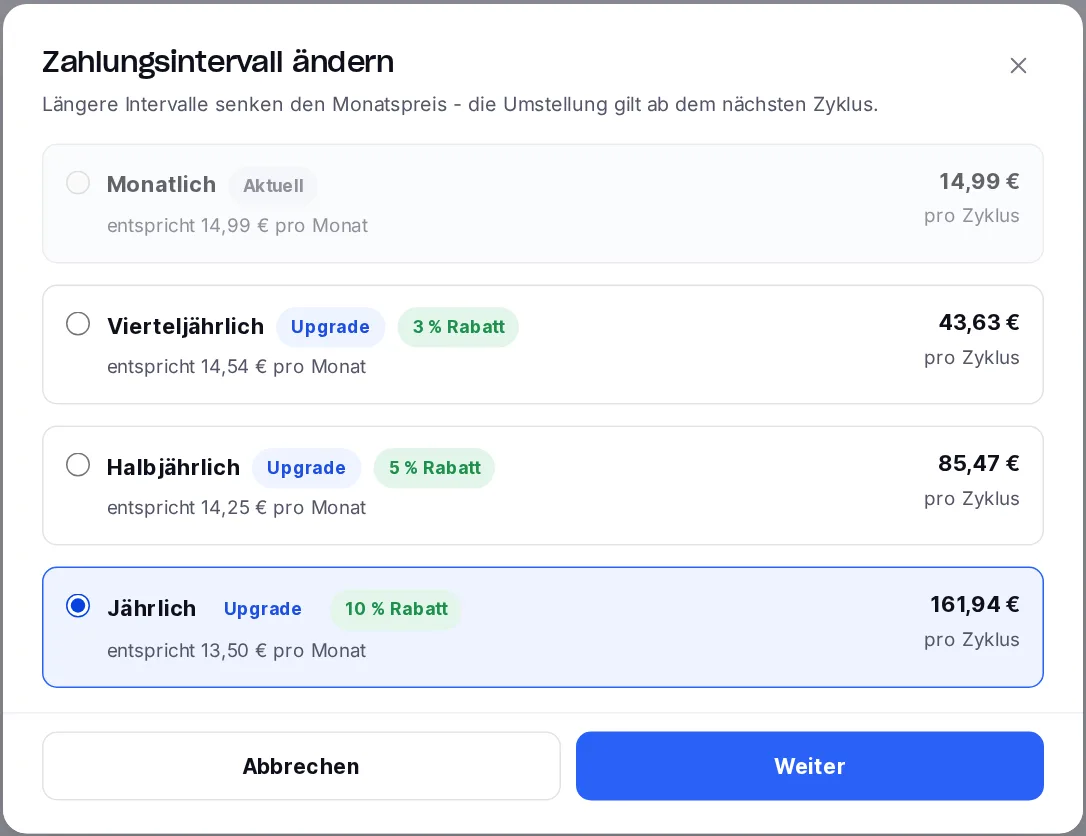
‘Change payment frequency’ dialogue box, with options for monthly, quarterly, half-yearly and annual payments, including a discount
The selection of plans, showing the price per cycle, monthly price and discount.

Step 3: Check the preview

The preview shows exactly what the change will mean for you. When switching to a longer billing cycle (for example, from monthly to annual), the following applies:

  • Any months you have already paid for will be added to your credit balance.
  • You will pay the difference for the new billing cycle. An invoice for the difference will be issued immediately - for customers on a consolidated billing plan, the amount will be included in the consolidated invoice.
  • The difference is calculated without the term discount. From the next full cycle onwards, the regular, discounted price applies.
  • The next billing date will be reset to align with the new billing interval.
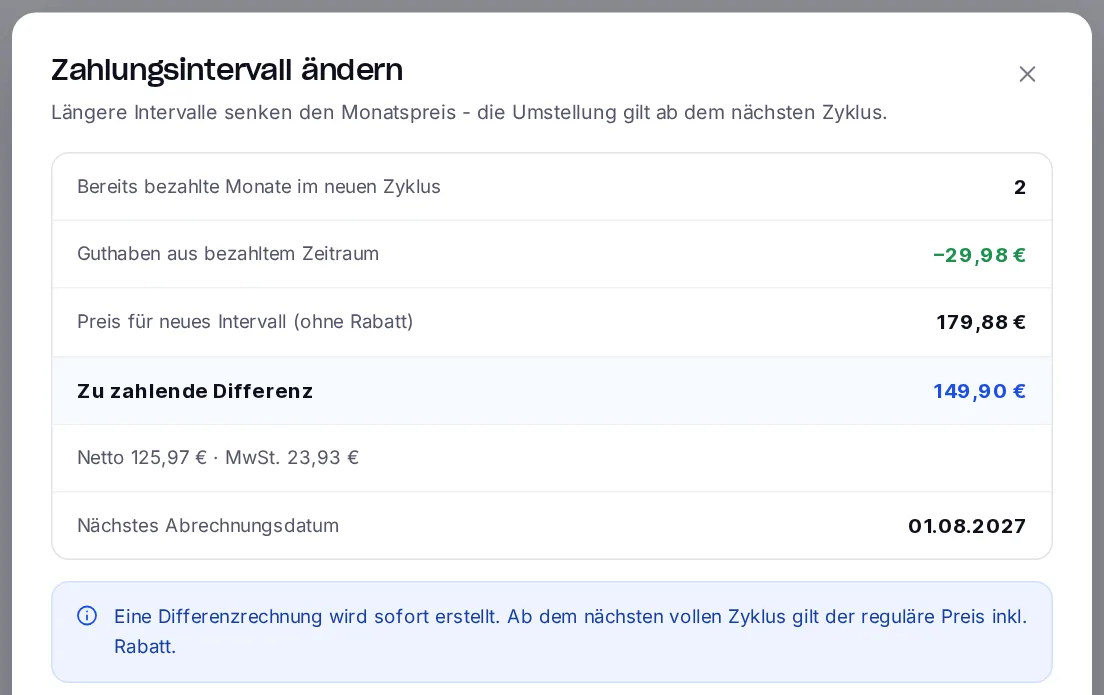
Preview of the interval change, showing the credit balance, the difference and the new billing date
The preview: credit balance, price for the new billing period, difference and next billing date.

Step 4: Confirm the minimum term and complete the switch

If the new interval is longer than the previous minimum term of your contract, the minimum term will increase accordingly - to 12 months if you pay annually. The preview will highlight this; confirm this by ticking the box and then click on ‘Confirm change’. You can then proceed directly to the difference calculation or return to the contract.
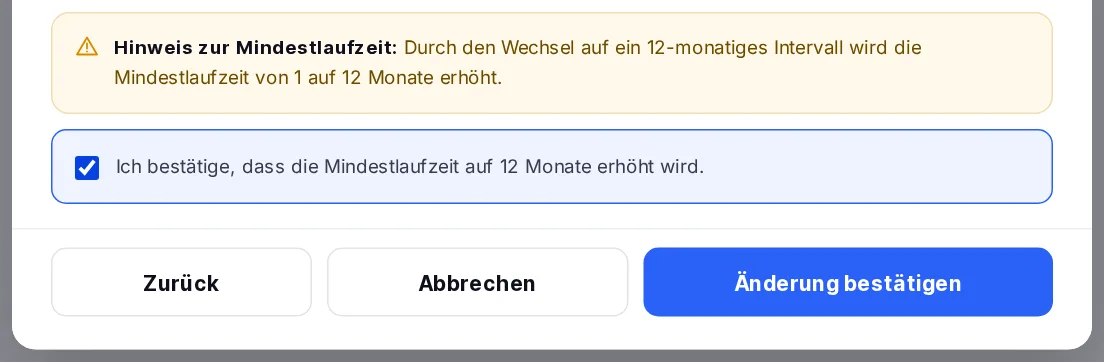
Note regarding the minimum term, with confirmation and a button to confirm the change
Note regarding the minimum term, with confirmation and the ‘Confirm change’ button.

Changing to a shorter billing cycle

If you switch to a shorter billing cycle (for example, from annual to monthly), the change will take effect on the next billing date. The period for which payment has already been made will continue as normal; no refund will be issued. Until then, your contract will display the message ‘Planned interval change’ along with the date of the change. As long as the change has not yet taken effect, you can cancel it there by selecting ‘Cancel planned change’.

Tip: pay annually and save money

With the annual payment option, you save 10 per cent on many products and receive just one invoice a year. If you have a payment method on file, the invoice will be settled automatically.

Will I lose money I’ve already paid if I switch to an annual payment plan?
No. Any months you have already paid for will be credited to your account as a credit balance; you will only pay the difference to the new billing cycle.
When does the discount start?
The difference in charge when switching is calculated without the term discount. From the next full billing cycle onwards, you will pay the regular, discounted price.
Will my notice period change?
The minimum term may be extended to the length of the new billing cycle; for annual payments, this would be 12 months. The preview will notify you of this before the change takes effect. You can find details on the term and cancellation in the ‘Manage contracts’ guide.
Can I cancel a planned change?
Yes, as long as the switch to a shorter billing cycle has not yet taken effect: Open the contract and click on ‘Cancel planned switch’ in the notice.

Was this article helpful?

New to SpeedIT Solutions?

Hosting where you know someone.

What you are reading here is what we put into practice for our customers every day. Based in Isernhagen since 2009 - with dedicated contact persons rather than a call centre.

  • 100 % Hosting in Deutschland
  • DSGVO-konform
  • Persönlicher Ansprechpartner
  • Bereitstellung innerhalb von 24 Stunden
4.9 88 reviews on Expeero

Sehr guter Hosting Service

Ich bin schon seit vielen Jahren Kunde und kann den vorbildlichen Service nur loben. Offene Fragen wurden kurzfristig beantwortet und Hilfestellung bei Konfiguration und Absicherung waren perfekt. Klare Empfehlung für mich.
Andreas W.Recommends us · 08/11/2026

100 % recommend us · Expeero

All reviews on HOSTtest (opens in a new window)

You might also be interested in:

Personal support

Of course, our support team is also happy to assist you personally. If you cannot find what you are looking for in our knowledge base or require personalised support, please do not hesitate to contact us. We’re here to help you and to ensure that your experience with our products and services is as smooth and enjoyable as possible.