If you use several of our products, such as web hosting, domains, SSL certificates and a cloud server, you will receive a separate invoice for each order and each contract renewal, rather than a consolidated invoice. With a consolidated invoice, we combine these amounts: you’ll receive one invoice on a fixed date, for example once a month.
What is a consolidated invoice?
Instead of billing each amount individually straight away, we group them together as items on your next consolidated invoice. This includes:
- Contract renewals for your products, such as the monthly hosting fee or domain renewal
- Orders placed in the shop - you do not have to pay for each order separately
- Any difference in amounts, for example when changing the payment frequency
On the agreed billing date, we’ll generate an invoice covering all outstanding items. You’ll receive it by email and can find it as usual under Billing → Invoices. The agreed payment term begins from that date.
Your benefits
- Fewer documents: one invoice instead of many individual ones - this simplifies bookkeeping and approvals.
- Predictable dates: fixed monthly or annual billing on an agreed date.
- Payment term: You make a single payment covering all outstanding amounts within the agreed period.
- Transparency: You can view all aggregated items at any time in the customer area.
Activation on request
We set up consolidated invoicing for customers with multiple products on request - for example, for agencies and businesses. Simply submit a support ticket to us. We will then work with you to agree on the billing cycle, billing date and payment term.
Find the consolidated invoice in the customer area
If the consolidated invoice is active for your account, the ‘Consolidated invoice’ button will appear in the top right-hand corner under ‘Billing’ → ‘Invoices’.

Overview: Dates and outstanding amount
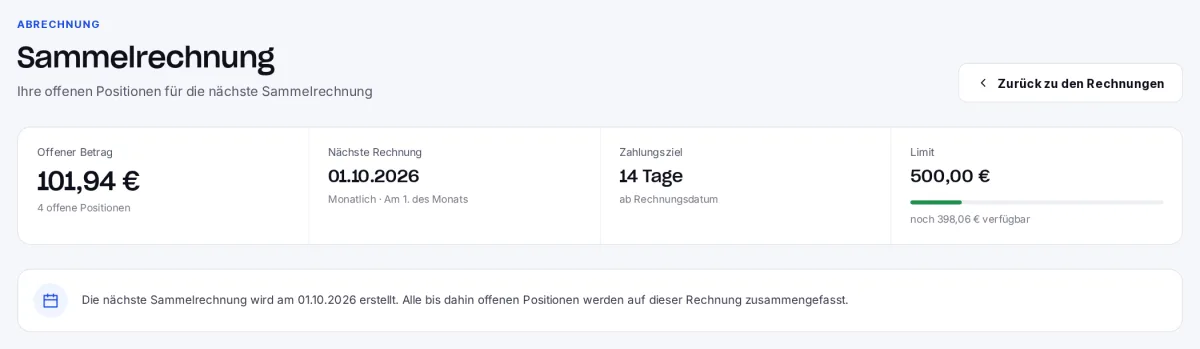
Above, you can see your agreement: billing cycle, billing date, payment term and the date of the next invoice. Next to this is the outstanding amount that has been accumulated so far for the next collective invoice. The tiles below summarise how many items are outstanding and how many have already been settled.
Limit on the outstanding amount
On request, we can set a limit on the outstanding amount. The overview will then show how much of this is still available. Once the limit is reached, the agreed rule applies: either you pay for the new order immediately, or it can only be processed after the next consolidated invoice.
The aggregated items
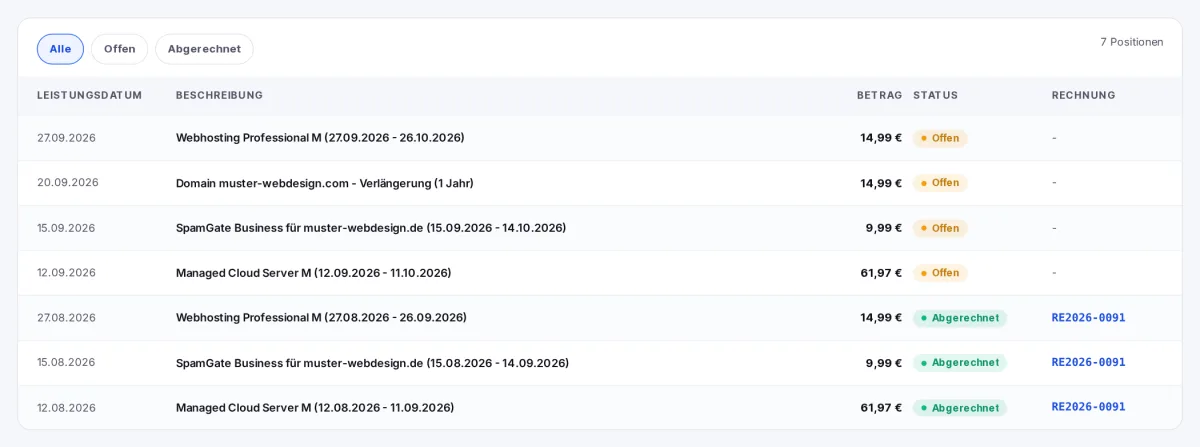
The ‘Items’ list shows each aggregated amount, along with the service date, description and amount. The status indicates whether an item is still outstanding and will appear on the next collective invoice, or whether it has already been billed - in which case the link in the ‘Invoice’ column takes you directly to the relevant invoice.