


If we manage your domain’s DNS, you can edit all entries in the domain details under the DNS tab. The entries are grouped by type.
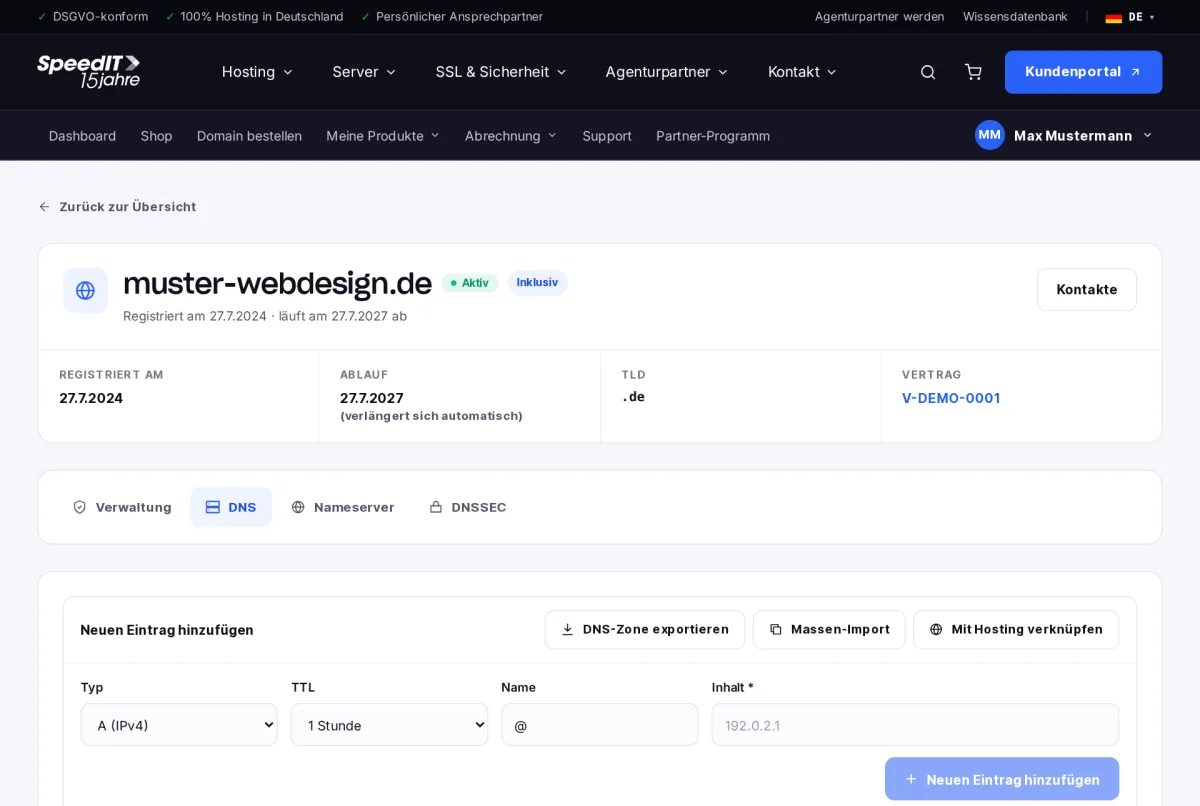
Add an entry
- Select the type, for example A (IPv4) or MX (mail).
- Set the TTL - 1 hour is a good standard.
- Enter the name, for example
www. For the domain itself, use@. - Enter the content, such as the IP address or the hostname.
- Click on ‘Add new entry’.
The main record types
- A / AAAA - point to a server’s IPv4 or IPv6 address
- CNAME - an alias to another name, for example for a CDN
- MX - specifies which server receives emails for your domain
- TXT - text records, for example for SPF, DKIM, DMARC or verification
- SRV - services such as telephony or chat
Multiple entries at once
You can edit several records at once using batch mode. Use bulk import to take over an existing zone, and use ‘Export DNS zone’ to back up your records.
When do changes take effect?
Changes take effect immediately on our name servers. Depending on the entry’s TTL, it may take up to 24 hours for the changes to be reflected everywhere - usually around an hour, depending on the configuration.
What does the @ in the name mean?
The @ symbol stands for the domain itself; for example, muster-webdesign.de without a subdomain.
Why can’t I see the ‘DNS’ tab?
This tab only appears if the domain uses our name servers. If you use your own name servers, you should manage the entries with your DNS provider.