


Under Billing → Invoices, you can view all invoices, grouped by month. At the top, the customer area summarises the outstanding amount, when the next direct debit is due, which payment method is on file, and how much credit you have.
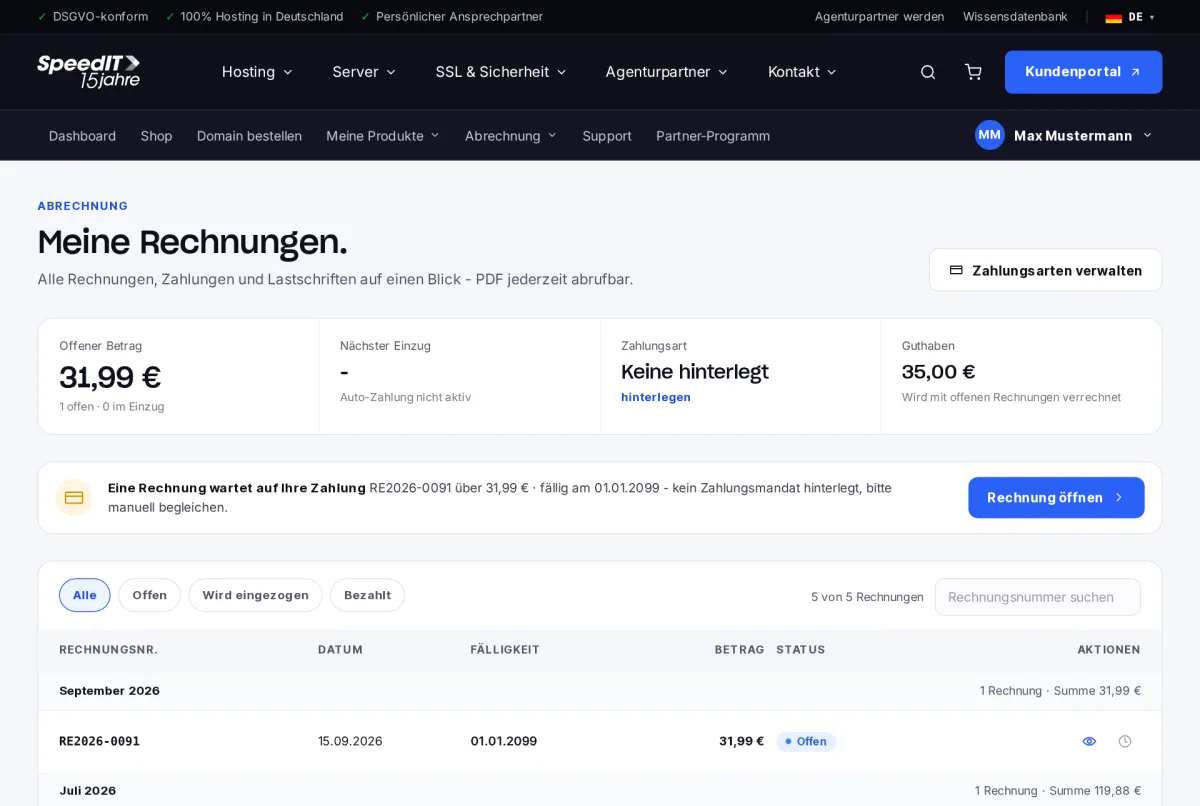
Filter invoices
Use the ‘All’, ‘Open’, ‘Due’ and ‘Paid’ tabs to narrow down the list. If an invoice is awaiting payment, a notification with a direct link will also appear.
Open and download an invoice
- Click on the invoice number.
- In the detailed view, you can see the line items, service period, tax and payment history.
- Select ‘Download as PDF’ to save the invoice for your accounts.
Invoices sent automatically to the accounts department
Under ‘Contacts & Account’, enter a separate email address for invoices - this way, your accounts department will receive every invoice directly.
Why does a new invoice say ‘PDF is being generated’?
New invoices are entered into our accounts and are assigned their final reference number. This usually takes just a few minutes.
Can I change my billing address at a later date?
Invoices that have already been issued cannot be amended. If there are any errors, please contact our support team - we will issue a corrected invoice if necessary.