

Skip to content
  • GDPR-compliant
  • 100% hosting in Germany
  • Personal contact
  • Support included
  • Provisioning within 24 hours
Webmail 1 min read

Webmail - Creating and using a signature

The Webmailer offers a signature function, which allows you to automatically add a predefined text at the end of your email.

Webmail - Setting up a signature

First, log in to your webmail client, which you can access via the URL “https://webmail.IhrHostingServername.de”. To do this, use the email address you have set up and the corresponding password.

Next, click on ‘Settings’ on the left-hand side, then select ‘Identities’. Select your email address and enter your signature in the field on the right. Here, you can insert any text, images or HTML elements you wish.
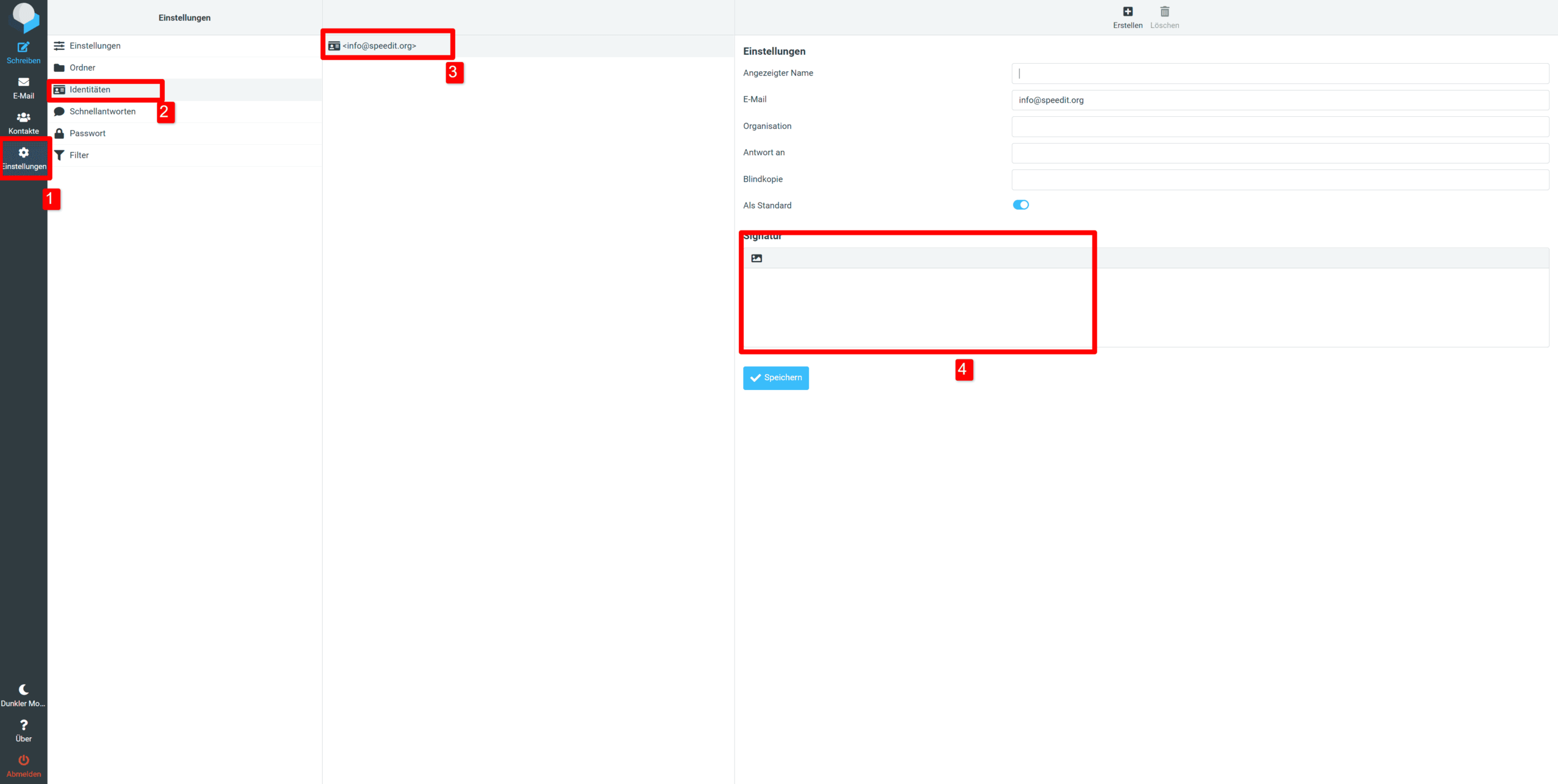
SpeedIT Webmailer - Signatur Einstellungen
SpeedIT Webmail - Signature Settings

Important: The signature you set will only be used for emails sent via the webmail client.

Was this article helpful?

You might also be interested in:

Personal support

Of course, our support team is also happy to assist you personally. If you cannot find what you are looking for in our knowledge base or require personalised support, please do not hesitate to contact us. We’re here to help you and to ensure that your experience with our products and services is as smooth and enjoyable as possible.