
SPF records are an important part of email delivery. They are designed to prevent spoofing attacks on email accounts and to ensure that only authorised servers are permitted to send emails from a specific domain. In this blog post, we explain what SPF records are, how they work, and what advantages and disadvantages they offer. We’ll also show you how to create one.
What are SPF records?
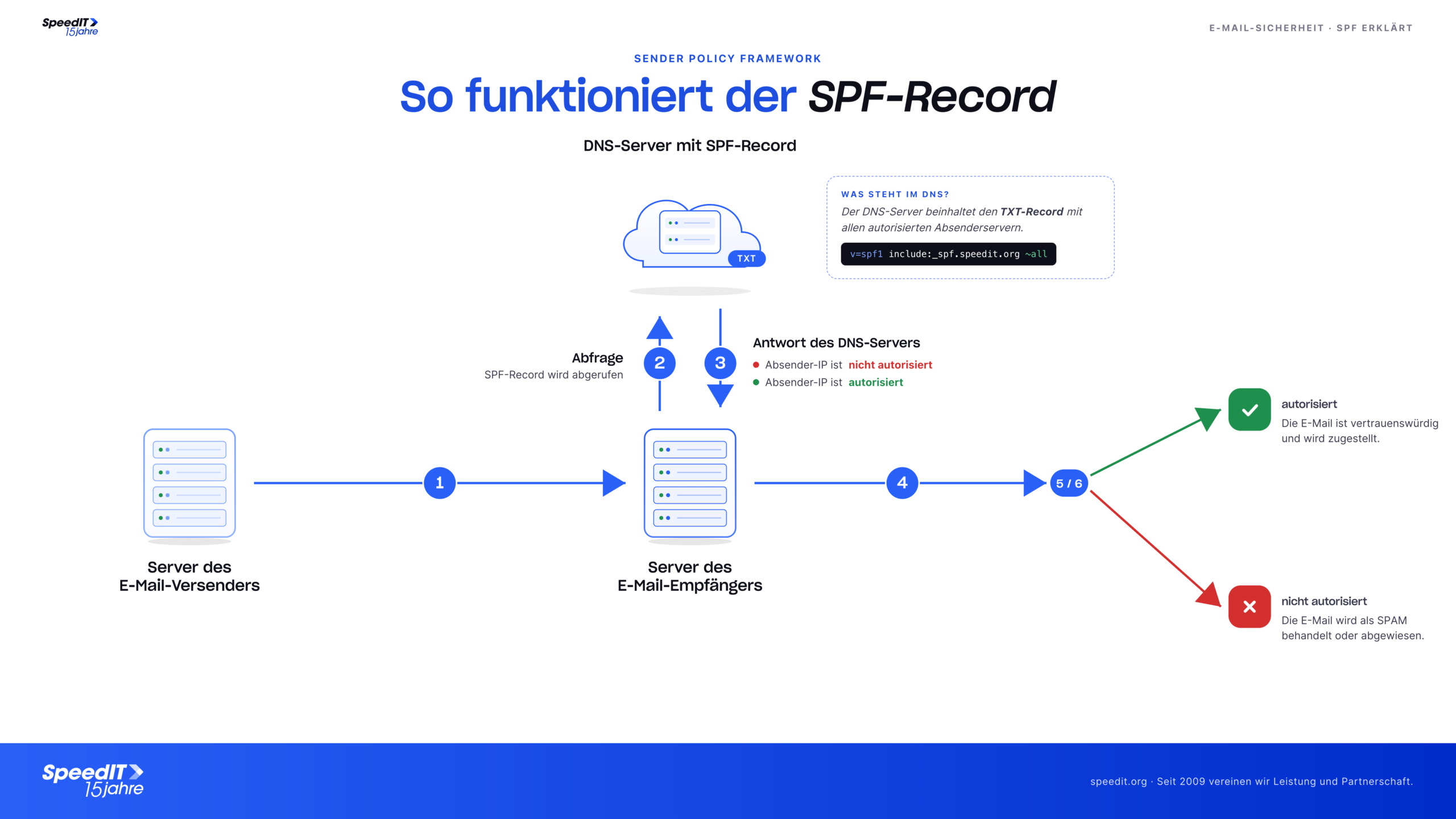
SPF (Sender Policy Framework) records are DNS records that specify which servers are authorised to send emails from a particular domain. These records are used by the receiving email servers to verify whether a received email actually originates from an authorised server. When an email server receives an email, it checks whether the sender’s SPF record matches the actual server from which the email was sent. If this is not the case, the email server may classify the email as an attempt at spoofing and reject it. The exact behaviour in the event of an incorrect SPF record can be specified both in the SPF record itself and defined by the receiving server.
How does the process work?
The process consists of several steps. Firstly, the owner of a domain must create an SPF record in their DNS. This record contains information about which servers are authorised to send emails from that domain. For example, the record might read: “All emails from example.com should only be sent from server1.example.com and server2.example.com”.
When an email server receives an email from example.com, it first checks the SPF record for example.com. To do this, it extracts the domain name from the sender’s email address (e.g. info@example.com) and queries the DNS for the SPF record of example.com. The DNS then returns the relevant record.
The email server then compares the IP address of the server from which the email was sent with the authorised servers listed in the record. If the IP address of the actual server is included in the list, the email server accepts the email as valid. Otherwise, it rejects it as an attempt at spoofing.
What are the benefits of SPF records?
- SPF records help prevent spoofing attacks on email accounts. As only authorised servers are permitted to send emails from a specific domain, it is more difficult for attackers to impersonate someone else and thus gain access to sensitive data.
- SPF records improve email deliverability. When emails from unauthorised servers are rejected, the risk of them being classified as spam is reduced.
- SPF records help to strengthen trust in email as a means of communication. When users know that only authorised servers are permitted to send emails from a specific domain, they feel more secure when receiving emails.
Disadvantages of SPF records?
- Setting up and maintaining SPF records can take time and resources. It can be particularly difficult for organisations with many different servers and services to create a complete and up-to-date SPF record.
- SPF records do not offer 100% protection against spoofing attacks. There are methods that allow attackers to send emails from unauthorised servers despite an existing SPF record.
- Some email providers do not support SPF records. If a recipient is registered with such a provider, SPF records are not checked and the email will still be delivered, even if the sender is unauthorised.
Creating an SPF record
- To create an SPF record, you will need access to your domain management panel and some knowledge of DNS. Follow these steps:
- Compile a list of all servers and services authorised to send emails from your domain. These include, for example, your own email server, as well as external services such as newsletter providers or SaaS solutions.
- Create an SPF text that describes these authorised servers and services. For example, the text could read: "v=spf1 a mx include:NewsletterProvider.com include:_spf.SaaSSolution.com ~all"
- Add the SPF text as a TXT record in your DNS management panel. The record should have the hostname “example.com” and contain the SPF text you created earlier as its value.
- Check that the SPF record has been set up correctly by verifying it using an SPF checker.
- Make sure you check the record regularly and update it if the list of authorised servers or services changes.
Tip: A good generator for SPF records and a way to check existing SPF records is available free of charge at spf-record.de - this makes creating such records quick, easy and secure.
Conclusion
In summary, SPF records are an important part of email delivery, helping to prevent spoofing attacks and improve email deliverability. Although setting up and maintaining SPF records can take time and resources, they offer significant protection for email accounts overall.
Our shared hosting servers, of course, consistently check the SPF records of incoming emails and implement the very latest security standards.