DNSBL lists, also known as ‘blackhole lists’, are an important part of email protection. They serve to block unwanted emails from spammers and other undesirable senders before they even reach the recipient. In this article, you will learn what DNSBL lists are, how to check them and what purpose they serve.
What are DNSBL lists?
DNSBL stands for ‘Domain Name System Blackhole List’. Essentially, these are lists of IP addresses and domains that are considered unwanted and should therefore be blocked. These lists are created and maintained by various organisations and companies and can be used by anyone who integrates them into their email server software.
How does checking against DNSBL lists work?
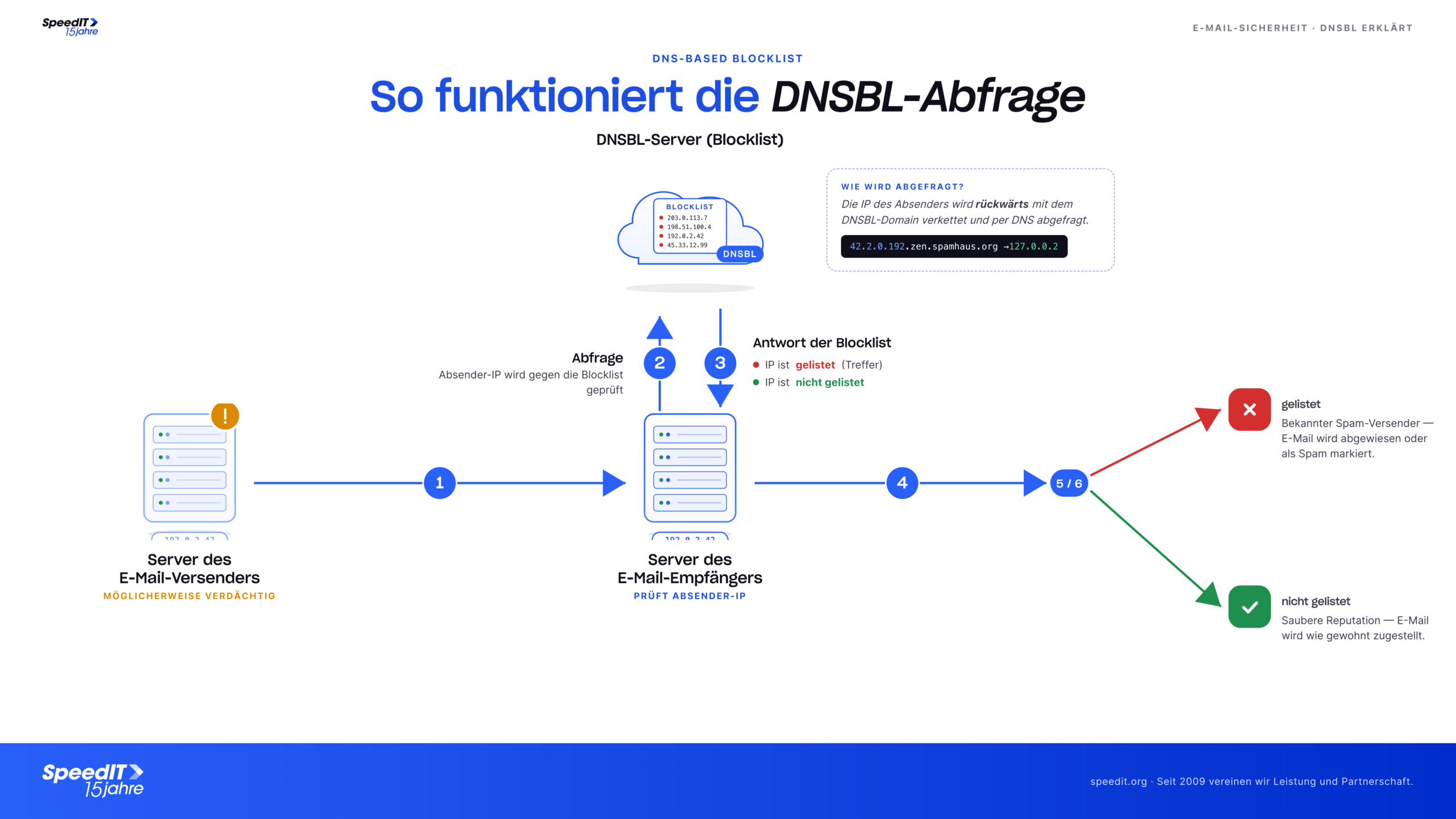
When an email is sent to a recipient, the first step is to check whether the sender’s IP address is listed on a DNSBL list. This is done by the email server sending a query to the DNS server of the DNSBL list and waiting to see if a response is returned. If the sender’s IP address is on the list, the email is blocked and not delivered. If no response is received, the email is delivered as normal.
What is the purpose of DNSBL lists?
The main function of DNSBL lists is to block unwanted emails from spammers and other unwanted senders, thereby ensuring greater security in email traffic. This helps to keep the recipient’s inbox clean and ensures that important emails are not pushed out by unwanted messages.
DNSBL lists can also help to reduce the risk of phishing attacks and other types of email fraud. As many spammers and unwanted senders are also responsible for these types of attacks, blocking their emails helps to minimise the risk of such attacks.
Another advantage of DNSBL lists is that they can help to reduce the email server’s bandwidth usage. As unwanted emails are blocked at the point of entry, they are not forwarded and therefore do not need to be processed. This can help to improve the performance of the email server and free up resources for important emails.
However, it is important to note that DNSBL lists are not perfect, and it is always possible that legitimate emails may be blocked accidentally. It is therefore important to ensure that the lists used are updated regularly and that mechanisms are in place to review blocked emails and forward them where necessary.
How can you check your own IP address?
There are several websites that allow you to check your own IP address against DNSBL lists. One example is “mxtoolbox.com/blacklists.aspx”. Simply enter your IP address into the search field and it will show whether the address is listed on any of the checked lists.
Conclusion:
DNSBL lists are an important part of email protection and can help block unwanted emails from spammers and other unwanted senders. They can also help to reduce the risk of phishing attacks and other types of email fraud, as well as minimise the email server’s bandwidth usage. However, it is important to ensure that the lists used are updated regularly and that mechanisms are in place to review blocked emails and forward them where necessary. Anyone can check their own IP address simply by using a website designed for this purpose.
We have compiled a list of the most important DNSBL (mail blacklist) providers for you in our knowledge base: DNSBL - Mail Blacklist Check